Businesses rely on laptops, servers, software licenses, cloud infrastructure, mobile devices, and countless other technology assets to operate efficiently.
As an organization grows, keeping track of these resources becomes increasingly difficult. Devices may go unaccounted for, software licenses may remain unused, and teams may purchase tools that the business already owns.
Without a clear picture of technology assets, companies can waste money, create security gaps, and struggle to plan future investments.
IT asset management services help businesses establish visibility and control over their technology resources, from acquisition and deployment to maintenance and retirement.
The goal is to ensure that assets are accounted for, used effectively, and managed according to business requirements.
What Is IT Asset Management?
IT asset management, commonly known as ITAM, is the process of tracking and managing an organization’s technology assets throughout their lifecycle.
It includes maintaining records of assets, understanding ownership, monitoring usage, managing licenses, scheduling maintenance, and planning replacements.
A well-organized IT asset management system can help businesses answer important questions:
-
What technology assets does the business own?
-
Which employee or department uses each asset?
-
When does a software license expire?
-
Which devices need maintenance or replacement?
-
Which subscriptions are underused?
-
Are any assets missing or no longer supported?
Having this information available makes technology management more structured and predictable.
Key Components of IT Asset Management
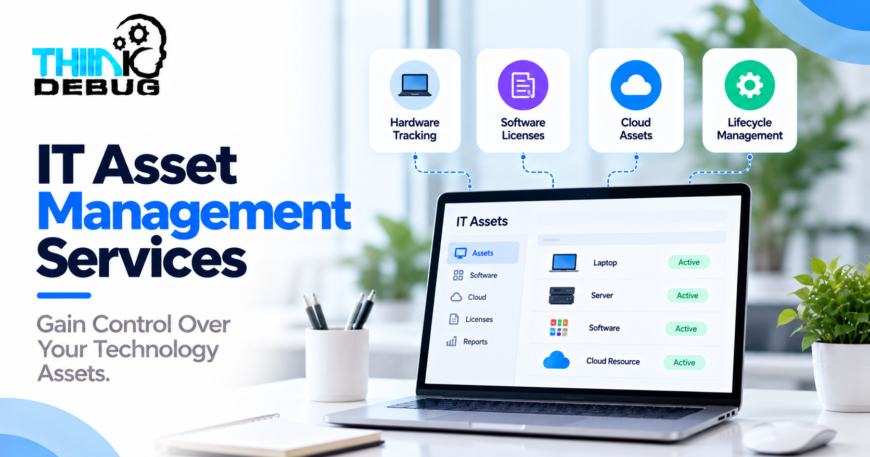
1. Hardware Asset Tracking
Businesses need visibility into physical equipment such as laptops, desktops, servers, networking devices, and mobile phones.
A centralized inventory can record asset identifiers, purchase dates, assigned employees, warranty details, locations, and maintenance history.
This makes it easier to locate equipment, manage transfers, and plan replacements.
2. Software License Management
Software subscriptions and licenses can become difficult to manage when different departments purchase tools independently.
IT asset management helps businesses monitor license assignments, renewal dates, usage, and contractual terms.
Regular reviews can reveal unused subscriptions and reduce avoidable expenses while helping maintain compliance with license agreements.
3. Cloud Asset Management
Cloud environments can contain virtual machines, storage volumes, databases, networking resources, and other services across multiple projects.
Tracking these resources helps organizations understand what exists, who owns it, and whether it is still required.
Cloud cost optimization focuses on spending efficiency, while IT asset management provides broader visibility and lifecycle control over technology resources.
4. Asset Lifecycle Management
Technology assets move through several stages:
Procurement → Deployment → Usage → Maintenance → Retirement
Managing each stage helps businesses maintain accurate records, plan upgrades, recover equipment, and dispose of retired devices responsibly.
5. Warranty and Maintenance Tracking
Unexpected equipment failures can disrupt business operations.
Tracking warranty periods, maintenance schedules, and device health helps teams identify upcoming requirements and reduce avoidable downtime.
Why Businesses Need IT Asset Management Services
Reduce Unnecessary Spending
An asset inventory can reveal unused equipment, duplicate software subscriptions, and resources that no longer serve a business purpose.
This information helps decision-makers prioritize cost-saving opportunities.
Strengthen Security
Unknown or unmanaged devices can create security risks.
A structured inventory helps security teams identify assets that need updates, track ownership, and locate equipment that may be lost or compromised.
Asset tracking should complement endpoint security, access management, patching, and incident response rather than replace them.
Improve Accountability
Assigning assets to employees, departments, or projects creates clearer responsibility.
When employees change roles or leave the organization, businesses can follow a defined process to recover devices, revoke access, and update asset records.
Support Better Planning
Accurate records help organizations forecast replacement cycles, anticipate license renewals, and plan technology budgets.
Instead of relying on incomplete spreadsheets, decision-makers can use consistent information to prioritize investments.
How to Implement an Effective IT Asset Management System
A practical implementation should begin with business requirements rather than simply selecting a software platform.
Step 1: Assess existing assets. Gather available records from spreadsheets, procurement systems, device management tools, cloud accounts, and software vendors.
Step 2: Establish a central inventory. Create consistent asset records with identifiers, ownership, status, location, and relevant financial information.
Step 3: Define ownership and processes. Decide who can create, update, transfer, approve, and retire assets.
Step 4: Automate where possible. Integrate inventory sources and configure notifications for renewals, warranties, assignments, and maintenance.
Step 5: Monitor and review. Schedule regular inventory checks, reconcile discrepancies, and review usage and lifecycle data.
Step 6: Improve continuously. Refine workflows as the business grows and new technology resources are introduced.
Automation can reduce manual effort, but periodic verification remains important to keep asset records accurate.
Custom IT Asset Management Software
Off-the-shelf tools may be sufficient for organizations with standard requirements. Businesses with specialized workflows, multiple locations, or complex approval processes may benefit from custom software.
A tailored system can include:
-
Centralized asset inventory
-
Employee and department assignments
-
Asset transfer and return workflows
-
License and subscription tracking
-
Warranty and maintenance alerts
-
Role-based access controls
-
Audit history and reporting
-
Integrations with HR, procurement, and finance systems
The right solution depends on the size of the organization, the types of assets involved, and the systems already in use.
How ThinkDebug Can Help
ThinkDebug develops custom software, business applications, integrations, and technology solutions that can support asset management requirements.
Depending on the project scope, ThinkDebug can help businesses design centralized asset tracking platforms, automate approval workflows, integrate existing systems, and build reporting dashboards.
For organizations that already use asset management software, integration and customization may be more practical than replacing the entire platform.
The objective is to create a maintainable solution that improves visibility, reduces manual work, and supports the organization’s operational requirements.
Conclusion
Technology assets are valuable business resources, but managing them without accurate records can lead to unnecessary expenses, security gaps, and operational inefficiencies.
IT asset management services help organizations track their technology resources, manage licenses, establish accountability, and plan asset lifecycles more effectively.
With the right processes and supporting software, businesses can gain better control over their technology investments and make more informed decisions as they grow.
Need a centralized system to manage your company’s technology assets? Contact ThinkDebug to discuss a custom IT asset management solution tailored to your business workflows.
